
Overview
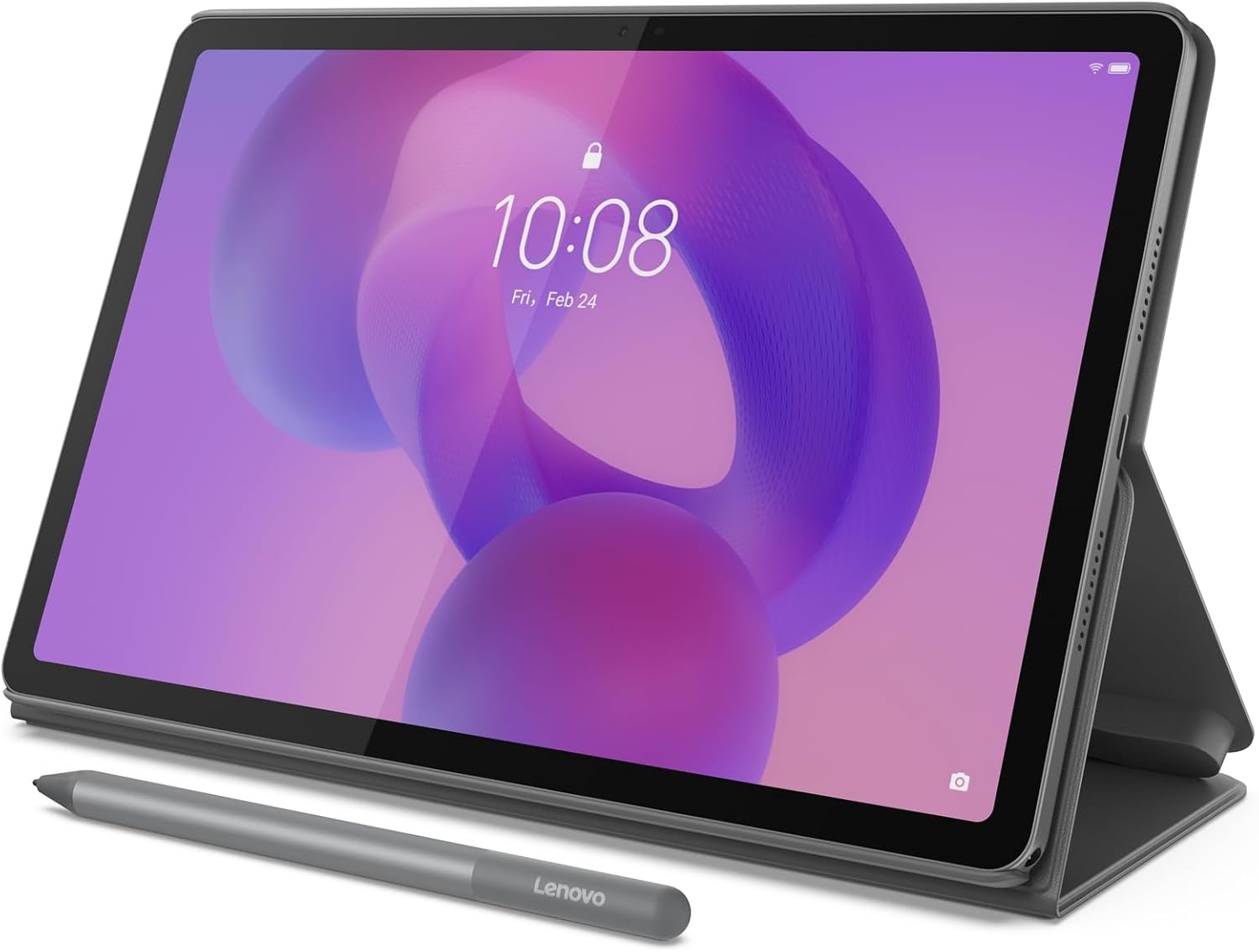
The Lenovo Idea Tab is a budget-friendly 11-inch Android tablet marketed heavily toward students, positioned as an affordable alternative to pricier tablets like the iPad or Samsung Galaxy Tab S6 Lite. It pairs an 11-inch 2.5K LCD IPS display with a 90Hz refresh rate, a MediaTek Dimensity 6300 processor, and either 4GB or 8GB of RAM depending on configuration, alongside 128GB of storage. It ships with Android 15, is guaranteed two OS updates and security patches through 2029, and typically sells for well under $200 — often bundled with a stylus (Tab Pen) and optional folio keyboard case.

Display
This is consistently the tablet’s standout feature across every review referenced here. The 2.5K resolution combined with a smooth 90Hz refresh rate produces a picture reviewers repeatedly describe as sharp, crisp, and genuinely impressive for the price — one reviewer specifically noted the Idea Tab’s screen outperformed the Samsung Galaxy Tab S6 Lite 2024 Edition in a direct side-by-side comparison, and even matched the peak brightness of the considerably pricier 11-inch iPad. The one recurring criticism is viewing angles: the panel looks bright and high-contrast head-on, but brightness noticeably drops off at an angle — a minor issue if you’re using it solo, but worth knowing if you plan to share the screen with others for movies or shows.
Performance
Here’s where the picture gets more mixed, and it’s worth being direct about it. The MediaTek Dimensity 6300 chip handles everyday tasks — web browsing, media consumption, note-taking, and light productivity — comfortably enough, and reviewers testing the 8GB configuration found it capable of even some light video editing without major issue. However, multiple reviews specifically flag RAM as the tablet’s Achilles’ heel, particularly on the base 4GB configuration: with only one or two apps open, performance is fine, but anything more demanding, or running multiple user profiles, starts to strain the hardware. One reviewer testing a 4GB unit described noticing occasional stuttering when scrolling or switching apps, despite the smooth 90Hz display — a genuine software/hardware mismatch that seems tied specifically to the lower-RAM configuration. If you can afford the step up to 8GB, multiple reviews suggest it’s worth the difference for meaningfully smoother day-to-day use.
Gaming performance is similarly a mixed bag — older or less demanding titles run smoothly, but some current AAA games struggle even at lower graphics settings, which tracks with a mid-range chip at this price point rather than a dedicated gaming tablet.
Build Quality and Design
For a budget tablet, build quality earns consistent praise. The aluminum back gives it a noticeably premium feel that belies its price, and it carries an IP52 rating for basic protection against dust and light splashing — a genuinely useful feature for students who might have it out during a spilled coffee or a sudden light rain on campus. At 480g, it stays reasonably light and portable despite the larger 11-inch screen size.
Audio
The quad-speaker setup, tuned with Dolby Atmos, is another pleasant surprise for a tablet in this price bracket. Reviewers describe the speakers as loud and clear enough for casual movie watching or music without significant distortion at higher volumes — while headphones are still the better call for serious listening, the built-in audio holds up well for a device at this price.
Stylus and Keyboard
The included Tab Pen adds real value for note-taking and light sketching, and one reviewer specifically described the writing experience as feeling natural during a study session, though it’s worth noting this isn’t the most precise stylus on the market — a fair trade-off given the price point. The magnetic attachment point for the stylus has drawn some criticism on the related Idea Tab Plus model for feeling weak and prone to the pen falling off, so it’s worth handling the connection carefully if that’s a priority for you. An optional folio keyboard case is also available, adding genuine productivity value for note-taking or light writing tasks, though it won’t replace a full laptop for serious work.
Battery Life and Software Longevity
Battery life is consistently described as solid, holding up through a full day of mixed study and media use — enough for lectures, PDFs, and note-taking across a typical school day without needing a midday charge. On the software side, shipping with Android 15 and a guarantee of two more OS updates plus security patches through 2029 is a genuinely strong commitment for a budget tablet, giving it real longevity beyond just its initial purchase.
Bloatware
One practical annoyance worth flagging: at least one reviewer reported needing to spend roughly an hour uninstalling over 25 pre-installed bloatware apps and games before the tablet felt genuinely clean and usable — a bit of extra setup effort worth budgeting time for out of the box.
Pros and Cons
Verdict
The Lenovo Idea Tab delivers a genuinely impressive display and solid overall build quality for a tablet well under $200, making it an easy recommendation for students who mainly need something for note-taking, reading, lectures, and casual media consumption. The catch is RAM: if you can budget for the 8GB configuration over the base 4GB model, do it — multiple reviews point to that upgrade as the difference between a smooth, satisfying daily driver and a tablet that occasionally stutters under its own display’s demands. Temper your expectations around gaming and heavy multitasking, and this is a genuinely strong budget pick.

Related Posts
Alienware Aurora (ACT1250) Review: A Striking, Capable Prebuilt — If You Accept Its Upgrade Limits
Alienware Aurora (ACT1250) Review Overview This review covers the Alienware…
FelixKing Ergonomic Executive Chair Review: Big Comfort, Small Price
Review FelixKing has become one of the most recognizable names…

Ninja PB051 Pods & Grounds Coffee Maker Review: Versatile, But Not Coffee-Shop Hot
Ninja PB051 Pods & Grounds Coffee Maker Review The Ninja…
