A detailed review of the Logitech K400 Plus Wireless Touch Keyboard with built-in touchpad, covering battery life, wireless range, compatibility, and whether it’s the right HTPC keyboard for your PC-connected TV.
Overview
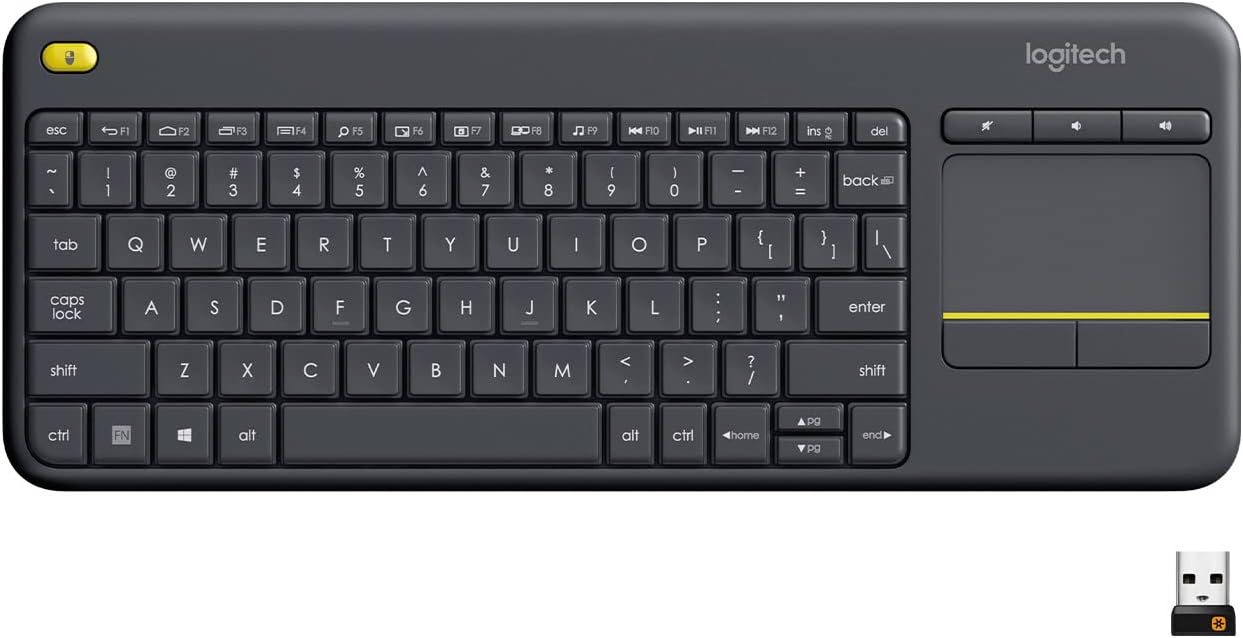
The Logitech K400 Plus is a compact wireless keyboard built specifically for HTPC (home theater PC) setups — think controlling a PC-connected TV from the couch. It combines a full keyboard with a built-in touchpad and easy media controls, eliminating the need for a separate mouse when navigating from across the room. It’s a long-running, well-reviewed product in Logitech’s lineup, and its simplicity is exactly the point: plug it in, sit back, and control everything without a lap desk or second peripheral.
Setup and Connectivity
Setup is genuinely plug-and-play: the keyboard connects instantly via Logitech’s small Unifying USB receiver, with further customization available through the Logitech Options software. It’s compatible with Windows 7 and up, Android 7.0 and later, and ChromeOS, covering most home entertainment setups without extra drivers or fuss.
Wireless range is rated up to 33 feet (10 meters), which Logitech notes may vary depending on user, environmental, and computing conditions — but for typical living-room-to-TV distances, most users find it more than sufficient with no noticeable lag or dropouts.

Touchpad and Typing Experience
The large 3.5-inch built-in touchpad is the keyboard’s centerpiece feature, letting you navigate menus, browse the web, and control media entirely from the keyboard itself. Reviewers on secondary marketplaces consistently describe the typing experience positively; one buyer specifically called out that it works reliably with no connection problems once set up on a PC under the TV.
<cite index=”25-1″>The keys themselves are designed to be quiet, which matters in a living room setting where you don’t want typing noise competing with whatever’s on screen.</cite>
Battery Life and Durability
Logitech rates the K400 Plus for up to 18 months of battery life, aided by a physical on/off switch that extends longevity further> — a genuinely strong figure compared to many wireless keyboards that need recharging every few weeks. It also carries a spill-resistant design, tested to handle limited liquid spillage (up to 60 ml), though it shouldn’t be submerged. That’s a reassuring detail for anyone using it near drinks on the couch or coffee table.
Compatibility Note
It’s worth noting this keyboard is aimed squarely at HTPC and casual navigation use — light browsing, streaming app control, and general typing — rather than gaming or heavy productivity work. If you need illuminated keys or Bluetooth multi-device switching, Logitech’s own K830 sits a tier above as a direct upgrade path.
Pros and Cons
Verdict
The Logitech K400 Plus does exactly what it sets out to do: it turns any PC-connected TV into an easy-to-control entertainment hub without cluttering your setup with a separate mouse. Reliable connectivity, a genuinely long battery life, and a spacious touchpad make it one of the most dependable HTPC keyboards on the market. It’s not built for gaming or serious productivity, but for streaming, browsing, and basic navigation from the couch, it remains a smart, affordable pick.
Related Posts

Dr. Brown’s Options+ Baby Bottle (4oz, 4-Pack) Review: The Flexible Version of a Trusted Anti-Colic System
Overview This review covers the specific product listed under this…

WOLFBOX MF50 Electric Air Duster Review — One of the Best Alternatives to Compressed Air?
TheThe WOLFBOX MF50 has become one of the most talked-about…
Alienware Aurora (ACT1250) Review: A Striking, Capable Prebuilt — If You Accept Its Upgrade Limits
Alienware Aurora (ACT1250) Review Overview This review covers the Alienware…
