
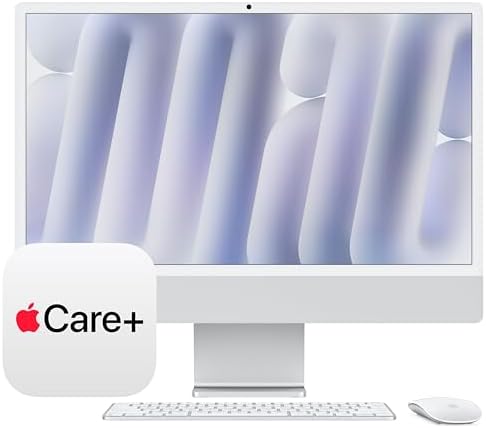
- BRILLLLLLIANT — iMac is the ultimate all-in-one desktop computer, powered by the M4 chip and built for Apple Intelligenc…
- FITS PERFECTLY IN YOUR SPACE — The all-in-one desktop design is strikingly thin, comes in seven vibrant colors, and elev…
- BUILT FOR APPLE INTELLIGENCE — Apple Intelligence is the personal intelligence system that helps you write, express your…

iMac 24″ M4 (Base Model) Review
This is the entry-level configuration of Apple’s 2024 24-inch iMac: the M4 chip with an 8-core CPU and 8-core GPU, 16GB of unified memory, and a 256GB SSD, in Blue. This is an important distinction to make clear up front, because Apple sells this same iMac generation in two meaningfully different tiers. The base 8-core model reviewed here starts at $1,299, while every other configuration steps up to a 10-core CPU and 10-core GPU starting at $1,499 — and that upgrade brings more than just extra processing cores, as covered below.

What critics loved about this generation overall
TechRadar’s review called this simply the best all-in-one computer you can buy, praising the M4 chip’s speed boost and specifically highlighting that the starting configuration finally moved from a widely criticized 8GB of base memory (on the previous M3 generation) up to 16GB — a change multiple outlets described as a genuinely welcome, overdue fix that makes the entry-level iMac meaningfully more usable out of the box than its predecessor. Engadget’s review echoed this almost exactly, calling the memory bump the single biggest reason the $1,299 price point is now actually cost-effective for most buyers, where it wasn’t before. The 24-inch 4.5K Retina display, at 500 nits of brightness, continues to earn consistent praise across every review for its sharpness, color accuracy, and consistency with other Apple devices — Digital Camera World’s reviewer specifically praised how reliably it renders photo edits compared to using various different displays. Design-wise, this generation is functionally identical to the previous iMac, in the same seven-color options, so if you liked how recent iMacs looked and felt, nothing has changed there.
What you specifically don’t get with the base 8-core model
This is the most important, practical information for anyone specifically looking at this configuration, and it’s worth being very clear about it rather than treating it as a footnote. Multiple reviews independently confirmed the same list of omissions on the base 8-core model compared to every other iMac M4 configuration:
- No Gigabit Ethernet. Every other iMac M4 configuration includes it built into the power adapter; the base model does not.
- Only two Thunderbolt 4 ports, compared to four on every other configuration.
- No Touch ID on the included Magic Keyboard. Engadget specifically noted this omission applies only to the base model — every other configuration includes Touch ID as standard.
- No option for the nano-texture glass finish, which is only available on the higher-tier 10-core configurations.
None of these are deal-breakers for casual, everyday use — web browsing, email, video calls, light photo editing, and general productivity — but they matter if you specifically wanted wired networking, more simultaneous accessory connections, or biometric login via your keyboard.
Performance: a real, meaningful step up from the M3 generation
Engadget’s testing, after using the M4 iMac for content creation, gaming, and productivity, concluded plainly that the generational upgrade was genuinely worth it this time, a notable statement given how iterative recent iMac refreshes have sometimes felt. TechRadar’s review agreed the M4 chip meaningfully speeds up everyday tasks. That said, it’s worth being clear about the honest trade-off at the 8-core tier specifically: TechRadar’s separate comparison piece against the MacBook Pro M4 noted the base 8-core iMac configuration gives up a real performance edge in graphics-intensive tasks like video editing or gaming compared to the 10-core variants, since the extra GPU cores make a measurable difference in those specific workloads. If your use case leans toward light everyday computing, this won’t matter much; if you’re doing regular photo or video editing, it’s worth knowing you’re getting less GPU headroom than the step-up configuration offers.
Storage: the other honest trade-off
At 256GB, base storage is workable for cloud-reliant users who don’t keep large local media libraries, but it fills up quickly if you install several substantial applications, keep a large photo library locally, or work with large video files. Given that iMacs are not user-upgradeable after purchase, it’s worth thinking carefully about whether 256GB will genuinely be enough for your workflow over the next several years, since there’s no way to add internal storage later — external drives are your only option down the line.
Verdict
The 24-inch iMac M4 remains, by wide critical consensus, the best all-in-one computer available, and the jump to 16GB of base memory genuinely makes this entry-level configuration a much more sensible buy than the memory-starved base models of previous generations. For everyday use — browsing, email, video calls, general productivity, and light creative work — this base 8-core configuration performs well and looks great doing it. The honest trade-offs are specific and real, though: no Ethernet, fewer ports, no Touch ID keyboard, and a GPU that gives up measurable performance in graphics-heavy tasks compared to Apple’s own 10-core configurations, all for a $200 difference. If you’re buying this purely as a home, student, or everyday productivity machine and don’t need wired networking or extra ports, this base configuration is a genuinely smart buy. If you do any regular photo or video editing, want Touch ID convenience, or need Ethernet and more ports, it’s worth seriously considering stepping up to the 10-core configuration instead — and either way, think carefully about whether 256GB of non-upgradeable storage will be enough for your needs over the life of the machine.
- BRILLLLLLIANT — iMac is the ultimate all-in-one desktop computer, powered by the M4 chip and built for Apple Intelligenc…
- FITS PERFECTLY IN YOUR SPACE — The all-in-one desktop design is strikingly thin, comes in seven vibrant colors, and elev…
- BUILT FOR APPLE INTELLIGENCE — Apple Intelligence is the personal intelligence system that helps you write, express your…



Related Posts

Best Car Cleaning Products: Ultimate Detailing Guide (2026)
Discover the best car cleaning and detailing products on Amazon.com…
Logitech G29 Driving Force Review: The Best Entry-Level Sim Racing Wheel?
Review The G29 has been Logitech's flagship PlayStation racing wheel…
MSI Stealth 16 AI+ (RTX 5070 Ti) Review: A Genuinely Premium Redesign, With a Pricing Trap to Avoid
MSI Stealth 16 AI+ (RTX 5070 Ti) Review A naming…
