
Overview
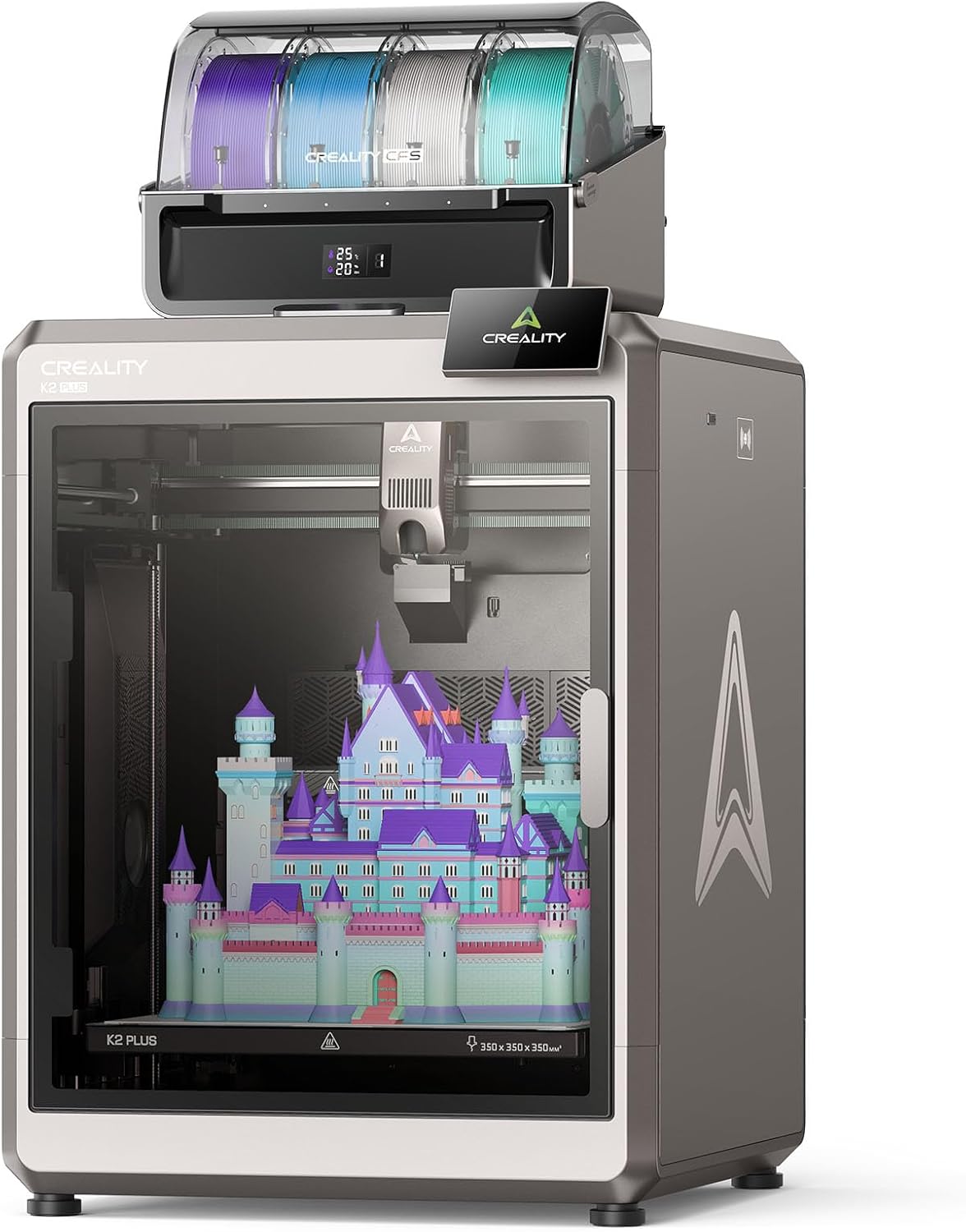
The Creality K2 Plus Combo is a large-format CoreXY 3D printer built for makers and small businesses who need serious build volume alongside genuine multicolor printing. It pairs a massive 350x350x350mm build volume with a high-temp direct-drive extruder capable of 350°C, a step-servo motor system, and claimed print speeds of up to 600mm/s. The Combo package bundles in Creality’s CFS (Creality Filament System) — a four-spool automated filament unit that handles feeding, color switching, and purging, expandable up to 16 colors by connecting up to four CFS units together. It’s priced around $1,299 for the standalone printer or roughly $1,499 for the Combo with one CFS unit, with additional CFS units sold separately for about $330 each.

Build Volume and Design
The headline feature here is sheer size. At 350mm cubed, the K2 Plus offers one of the largest build volumes available in its price range, letting you print oversized single objects or large batches without the constant replating that smaller printers require. The frame itself is built from die-cast aerospace-grade aluminum alloy with precision-machined steel components, giving it a genuinely sturdy, low-vibration feel during high-speed printing. It’s worth noting the printer is genuinely large and heavy — it ships in a substantial box weighing 46 to 54 kg depending on configuration, so plan for help unboxing and a permanent spot to keep it.
Setup and Ease of Use
Setup is largely praised across reviews. The printer arrives mostly pre-assembled, and a guided boot-up sequence walks you through self-tests like bed leveling and fan calibration without much manual intervention. One reviewer described the whole process as simple enough to walk away and grab coffee while the printer ran its initial checks. Best Buy customer reviews echo this, with several buyers specifically noting the setup was smoother than they expected for a machine this large and feature-dense.

Print Quality and Speed
This is where the K2 Plus consistently earns its praise. Independent reviewers rate its print quality as excellent, with one comparison noting it rivals the Bambu Lab X1 Carbon — widely considered a benchmark in the consumer 3D printing space — at comparable speeds, while maintaining tight dimensional accuracy even on large parts. The claimed 600mm/s top speed is genuinely achievable on simpler geometry, though as with most high-speed printers, real-world quality-focused prints run somewhat slower in practice.
The CFS Multicolor System: The Real Trade-Off
This is the most important section for anyone considering the Combo specifically for multicolor work, and reviews are refreshingly candid about it. The CFS system uses RFID technology to automatically identify filament type, color, and remaining weight, and can seamlessly swap to an equivalent filament if one runs low mid-print — a genuinely clever piece of engineering when it works as intended.
The catch, consistently flagged across nearly every in-depth review, is purge waste. Multicolor printing requires purging the nozzle between color changes, and the K2 Plus’s high-flow nozzle generates a meaningful amount of wasted filament in the process — commonly referred to in the 3D printing community as “poops” or purge blocks. One outlet’s testing produced 83 grams of waste material across just three modest multicolor prints. Reviewers generally advise sizing your waste tower carefully in the slicer and batching multiple models per print to offset the waste rather than running frequent small multicolor jobs.
One more limitation worth flagging: the CFS system lacks an active drying system for filament, which several reviewers call out as a notable gap given how much the rest of the system automates.
Reliability
Reception here is more mixed than the print quality praise would suggest. Several detailed reviews describe encountering errors during CFS operation that required troubleshooting to resolve, and one review specifically lowered its overall rating due to a rockier-than-expected experience getting consistent, error-free multicolor runs. At the same time, Creality has been actively pushing firmware updates that multiple reviewers credit with ironing out early CFS hiccups, and Best Buy customer reviews are largely positive, with most reported issues attributed to user error rather than hardware defects. It’s a printer that rewards patience and a willingness to troubleshoot — not necessarily a true plug-and-play experience for complex multicolor jobs, at least not yet.
Pros and Cons
Verdict
The Creality K2 Plus Combo delivers genuinely impressive hardware — a huge build volume, fast and accurate printing, and a multicolor system that, when it’s working well, produces results competitive with far pricier machines. The real question is how much patience you have for the CFS system’s growing pains: purge waste and occasional multicolor errors are real, recurring themes across independent reviews, even as ongoing firmware updates continue to smooth things out. For professional makers, small studios, or serious hobbyists who need scale and multicolor capability and are willing to learn the system’s quirks, it’s a strong, well-priced choice. If you want a more turnkey multicolor experience with less troubleshooting, it’s worth weighing against more polished (and pricier) alternatives.
Related Posts
Sweetcrispy Managerial Executive Chair Review: Solid Ergonomics on a Budget
Review Sweetcrispy has built a reputation as a budget-friendly brand…
Skylight Calendar 15″ Review (2026): The Best Smart Family Calendar — But Is the Subscription Worth It?
A 15.4-inch HD touchscreen, color-coded family scheduling, chore charts, meal…
OLANLY Chenille Bathroom Rug Review: A Genuinely Well-Reviewed Budget Bath Mat, With a Few Real Caveats
OLANLY Chenille Bathroom Rug Review This is OLANLY's 30x20 inch…
